Why your S3 static site returns 403
8 min readAtharva Tayade
A DevOps engineer's notes on the Configure an Amazon S3 bucket lab: three switches, the order that makes public access stick, and why the lab's bucket policy is one I would not ship.
I'm Atharva, a DevOps engineer in Pune. I write here about Cloud, Infra and AIOps, and most weeks that means a fair amount of time in the AWS console. Recently I ran through the Configure an Amazon S3 bucket lab. The steps are short enough to follow on autopilot, which is exactly the problem: do them without understanding the dependency chain and the next bucket you build will serve 403 Forbidden to everyone, including you.
This site is a static one, so I care about the simple end of hosting. S3 is the classic "upload a few files, get a URL, pay pennies" option, and it is worth knowing where its edges are. What follows is the lab walkthrough with the reasoning filled in, organized around the three switches I now check in order.
What you are actually building
An S3 bucket is object storage, not a web server. Each object can be up to 5 TB, there is no cap on total storage, and every object gets an HTTP URL. That is enough to serve HTML, CSS, images, and PDFs to a browser.
What you do not get: server-side code, per-user authentication, HTTPS on the static website endpoint, or a custom domain without extra services. For a brochure page, a docs site, or a demo, none of that matters. Anything with a login or an API needs a different tool.
The lab's target is a small "Hello World" page: an index.html, a stylesheet, a logo, and a PDF, all served from a public bucket.
Switch 1: Object Ownership
The lab tells you to set Object Ownership to ACLs enabled. That setting exists for one reason: the lab later uses Make public using ACL to publish the objects. Without ACLs enabled, that action is unavailable.
New buckets are private by default, and AWS now recommends Bucket owner enforced, which disables ACLs entirely. My rule is to decide how I will publish before I create the bucket, because the choice changes everything downstream. The lab picks object ACLs. A bucket policy would work too.
| Setting | Lab value | Why it matters |
|---|---|---|
| Region | US East (Ohio) / us-east-2 |
Sets the endpoint; cannot be changed later |
| Bucket name | s3-59676255 |
Must be globally unique and DNS-compatible |
| Object Ownership | ACLs enabled | Required for the lab's "Make public using ACL" step |
| Bucket Versioning | Enabled | Recovery and audit trail; optional for static hosting |
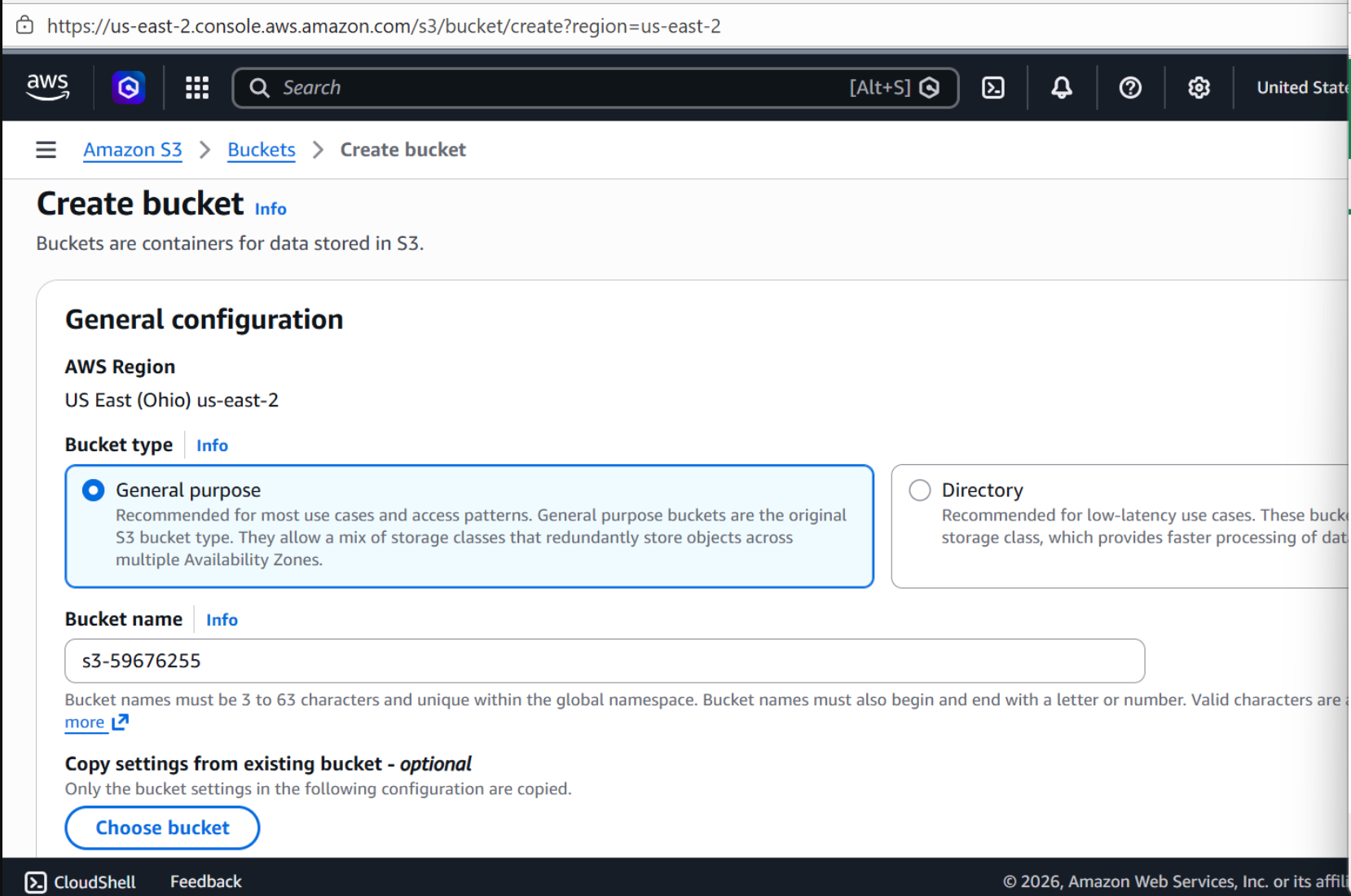
Steps: set the console region to US East (Ohio), open All services → Storage → S3, choose Create bucket, enter the name, keep the region, enable ACLs and versioning, then create it. Versioning is not needed for a static site, but it is cheap insurance against an accidental overwrite.
Switch 2: Block Public Access (the one I check first)
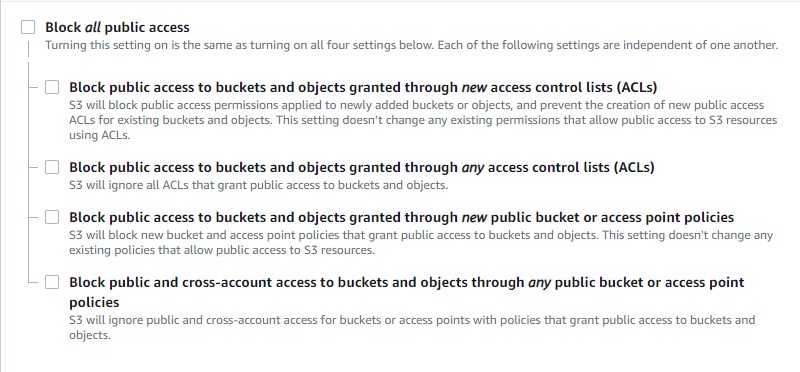
This is the switch people click through without reading, and the one I look at first when a public bucket misbehaves. Block Public Access is a set of four guards at the account and bucket level. The lab clears all of them, publishes the objects, then turns two of them back on.
The order is the whole trick:
- Unblock public access on the bucket.
- Upload the four files and make them public with an ACL.
- Re-enable the blocks for new ACLs and new public policies.
The site keeps working after step 3 because those final blocks stop future grants, not existing ones. Do step 3 before step 2 and every request returns 403 Forbidden, because the objects were never actually published.
Concretely:
- Open the bucket, go to Permissions, and choose Edit under Block public access (bucket settings).
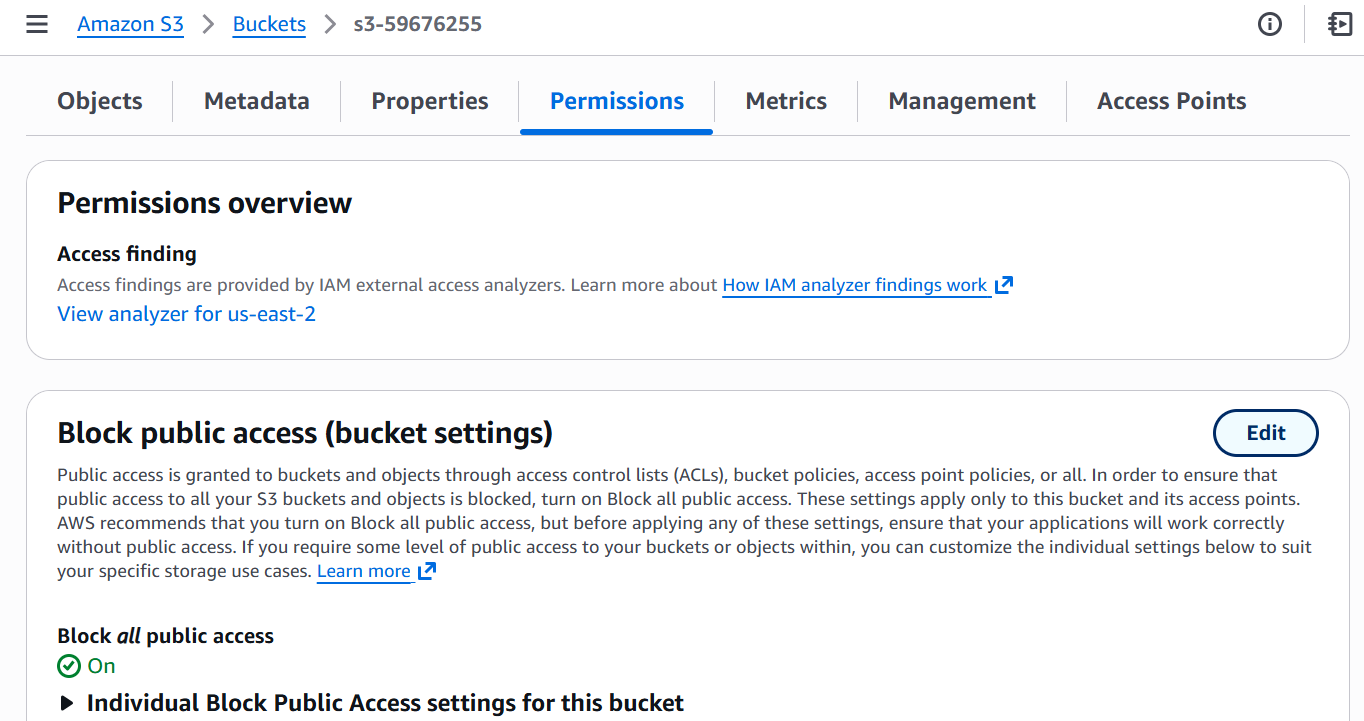
- Clear Block all public access, save, and type
confirmwhen prompted.
- Upload
index.html,hw.css,AWS_TE.pdf, andexpert-logo.jpg.
Create the two text files locally index.html and hw.css. add below text in index.html -
<!doctype html>
<html lang="en">
  <head>
    <meta charset="utf-8" />
    <meta name="viewport" content="width=device-width, initial-scale=1" />
    <title>Hello World!</title>
    <link rel="stylesheet" href="hw.css" />
  </head>
  <body>
    <div class="mainBox">
      <img src="expert-logo.jpg" alt="LODS Expert Challenge Logo" />
      <div class="textBox">
        <h1>Hello World!</h1>
        <p>
          More information about AWS Certification and Training can be found here:
          <a href="AWS_TE.pdf">AWS Certification and Training Overview</a>
        </p>
      </div>
    </div>
  </body>
</html>
And the stylesheet 'hw.css' :
body {
  background-color: #36a;
}
.mainBox {
  width: 100%;
  display: flex;
  flex-direction: column;
  align-items: center;
}
.textBox {
  width: 30%;
  text-align: center;
}
h1 {
  color: #fff;
}
img {
  width: 50%;
  border: 1px solid #fff;
}
download AWS_TE.pdf from https://github.com/0xsterat/AWS_TE1/raw/main/AWS_TE.pdf and expert-logo.jpg from https://github.com/0xsterat/AWS_TE1/raw/main/expert-logo.jpg repository on GitHub. Upload all four from the Objects tab. If any upload fails, re-upload just those files rather than the whole batch.

- Select all four objects, open Actions, and choose Make public using ACL.
- Go back to Block public access and re-enable the two options covering new ACLs and new public bucket policies. Confirm with
confirmagain.
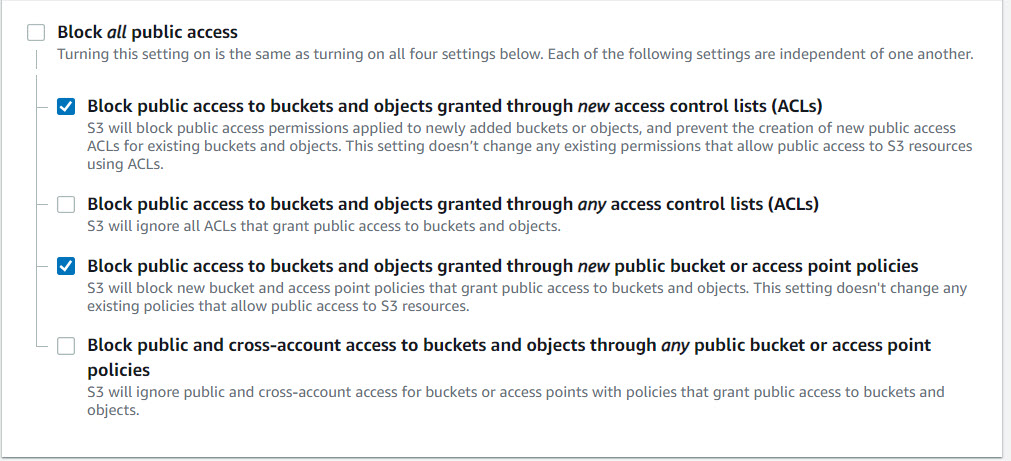
Public access is often called anonymous access. To grant it narrowly, you unblock everything, secure the specific objects you want to serve, then block public access for anything new.
Switch 3: the bucket policy (the one I would flag in a review)
The lab also asks you to paste this:
{
  "Version": "2012-10-17",
  "Statement": [
    {
      "Effect": "Allow",
      "Principal": "*",
      "Action": "s3:*",
      "Resource": "arn:aws:s3:::s3-59676255"
    }
  ]
}
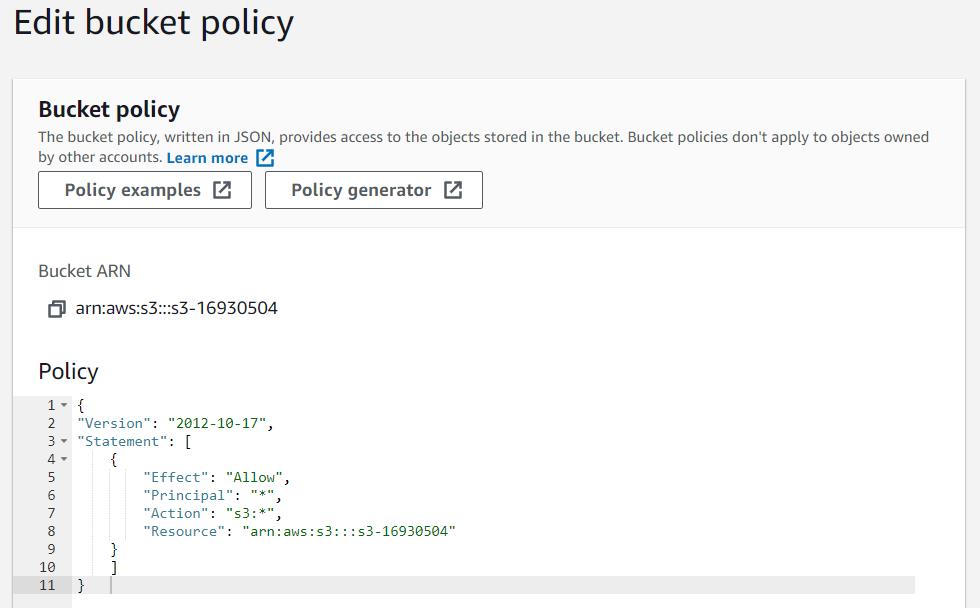
The console accepts it, but as someone who reviews infra changes, this is the part I would flag before it went anywhere near production:
"Principal": "*"is anonymous users, which is fine here only because the content is public."Action": "s3:*"grants every S3 action, not just reads.- The resource is the bucket ARN.
GetObjectworks on objects, so a policy scoped to the bucket does not grant reads onindex.htmlanyway. In the lab, the public ACLs are what actually serve the files.
If you want a public, read-only site through a policy, scope it to the objects and to GetObject:
{
  "Version": "2012-10-17",
  "Statement": [
    {
      "Sid": "PublicReadForStaticSite",
      "Effect": "Allow",
      "Principal": "*",
      "Action": "s3:GetObject",
      "Resource": "arn:aws:s3:::s3-59676255/*"
    }
  ]
}
Pick one publishing mechanism, not both. Use the scoped policy and leave ACLs disabled at creation, or use object ACLs and skip the policy. Doing both is how you end up with permissions nobody can reason about.
You may see a "Network Failure - verify permissions to access-analyzer:ValidatePolicy" message when saving. In this lab it is safe to ignore.
Turn on website hosting
- Open the bucket, go to Properties, and choose Edit under Static website hosting.
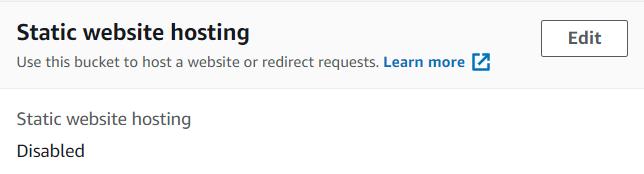
- Select Enable, then Host a static website.
- Set Index document to
index.html.
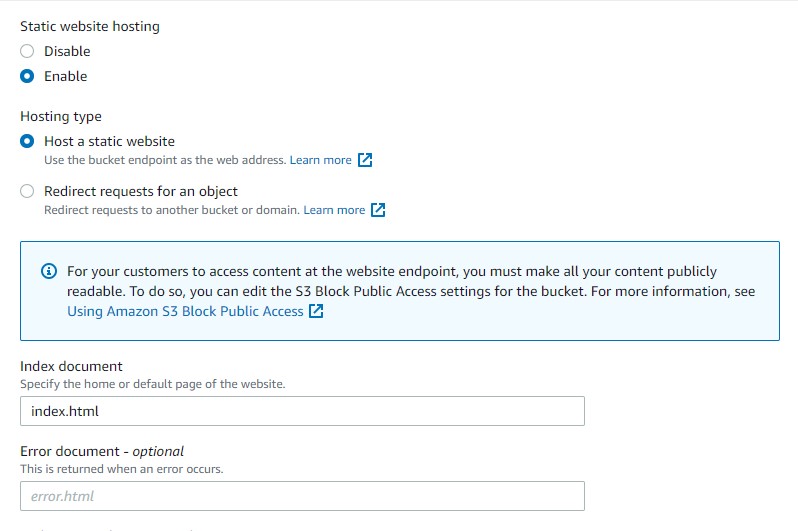
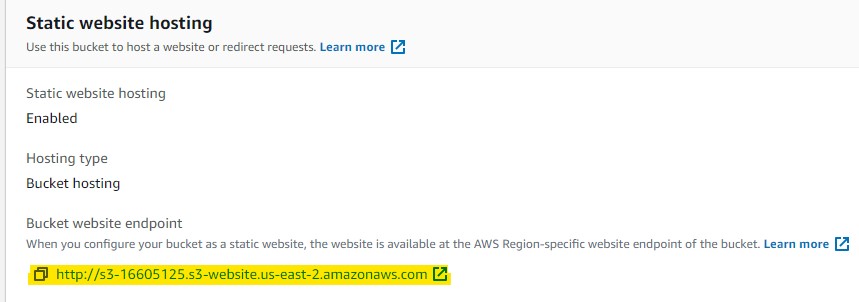
- Save, then open the Bucket website endpoint link.
The endpoint looks like http://s3-59676255.s3-website.us-east-2.amazonaws.com. Note the region in the hostname, and note that this is the website endpoint, not the REST endpoint (s3-59676255.s3.us-east-2.amazonaws.com). The website endpoint handles index documents and browser routing; the REST endpoint is for object-level access. Website endpoints do not support HTTPS, which is the main reason to put CloudFront in front of a real site.
You should now see the logo, the "Hello World!" heading, and a working PDF link.
The failure map
| Symptom | Likely cause |
|---|---|
403 Forbidden on the root URL |
Public access is still blocked, or the objects were never made public |
404 Not Found |
Index document name does not match the uploaded object key |
| Page loads without styles | hw.css is missing, misnamed, or the path is wrong |
PDF link returns AccessDenied |
That object is private even though the HTML is public |
| Works over HTTP but not HTTPS | S3 website endpoints do not support HTTPS |
| Old content after re-upload | Browser cache; versioning also keeps the old copy |
How I would actually ship this
Clicking through the console is the right way to learn it. In my day-to-day work I would not click any of it:
- Keep it as code. A few lines of Terraform or CloudFormation give me a reviewable diff and a repeatable rollback, instead of a list of steps someone has to remember.
- Skip ACLs. Set Object Ownership to Bucket owner enforced and publish through a policy scoped to
s3:GetObjecton the specific objects. - Put CloudFront in front. With Origin Access Control I get HTTPS, a custom domain through ACM, and caching. I would use the S3 REST endpoint as the origin, not the website endpoint.
- Deploy with OIDC. Let CI assume a short-lived role instead of storing access keys in a pipeline.
- Add headers and lifecycle rules. A
Cache-Controlheader on assets keeps deploys fast and predictable, and a lifecycle rule stops old versions from piling up.
The mental model
The click sequence stops feeling arbitrary once you see the chain:
- A bucket starts private, so something has to grant public reads: object ACLs or a scoped bucket policy.
- Block Public Access is a master veto on top of both, and the order you flip it in decides whether your publishes stick.
- The website endpoint is for browsers, the REST endpoint is for objects, and neither gives you HTTPS on its own.
Change any one of those without the others in mind and you get a 403 or a very public surprise. Get all three right and you have a site that costs pennies, has no moving parts, and is genuinely hard to take down.
If you are working through the same lab or fighting a public bucket that will not cooperate, I would like to hear what tripped you up. Find me on LinkedIn or open an issue on the GitHub repo behind this site.